
Download ChatWaifu – AI companion, local AI, desktop pet, 3D character, voice chat, tool function-call, customizable AI, interactive desktop, AI assistant, personal assistant
Overview
ChatWaifu is a desktop companion application designed to merge advanced artificial intelligence with an engaging, interactive experience. Positioned as a personal assistant and digital pet, it aims to enhance productivity and user engagement through intelligent automation and expressive interface design. The app leverages local AI models, enabling users to interact with their digital companion without relying on cloud-based processing, which enhances privacy and responsiveness. Its core purpose lies in simplifying daily tasks such as checking the weather, retrieving news updates, and managing routine queries through natural, conversational interaction.
Target users include tech enthusiasts, productivity seekers, and individuals who value personalized digital experiences. The application appeals to those interested in AI-driven tools that offer both utility and entertainment. As a desktop pet, it introduces a unique blend of functionality and emotional engagement, creating a sense of companionship. The integration of 3D character models and real-time voice interaction further elevates the user experience, making interactions feel dynamic and immersive.
While the developer, ChatWaifu, has not provided detailed background information, the app’s release date of August 12, 2024, marks its debut in the utilities category. The app’s presence in the desktop ecosystem reflects a growing trend toward localized, privacy-focused AI tools. Real-world use cases include using the AI companion to manage schedules, execute system commands via function calls, and enjoy personalized interactions throughout the day. With a free pricing model, ChatWaifu offers accessible entry into advanced AI-powered desktop experiences.
Key Features & Functionality
- One-Click AI Import: Users can seamlessly integrate mainstream local AI large language models with a single click, allowing rapid setup and customization. This feature reduces technical barriers for non-expert users while enabling advanced functionality.
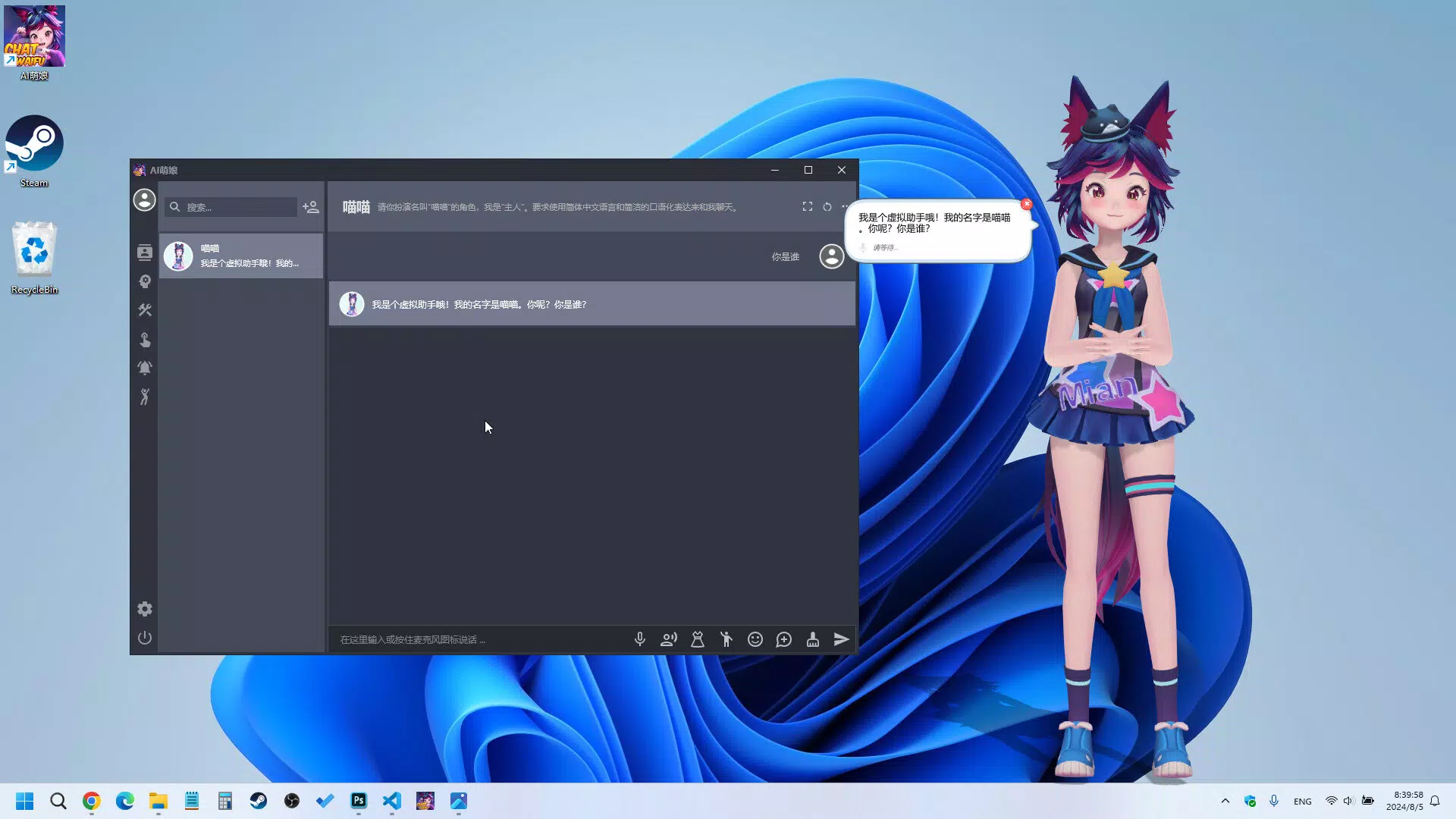
- Real-Time Voice Interaction: The app supports live voice chat, allowing users to speak naturally and receive immediate audio responses. This enhances accessibility and makes interactions feel more human-like, ideal for multitasking or hands-free use.
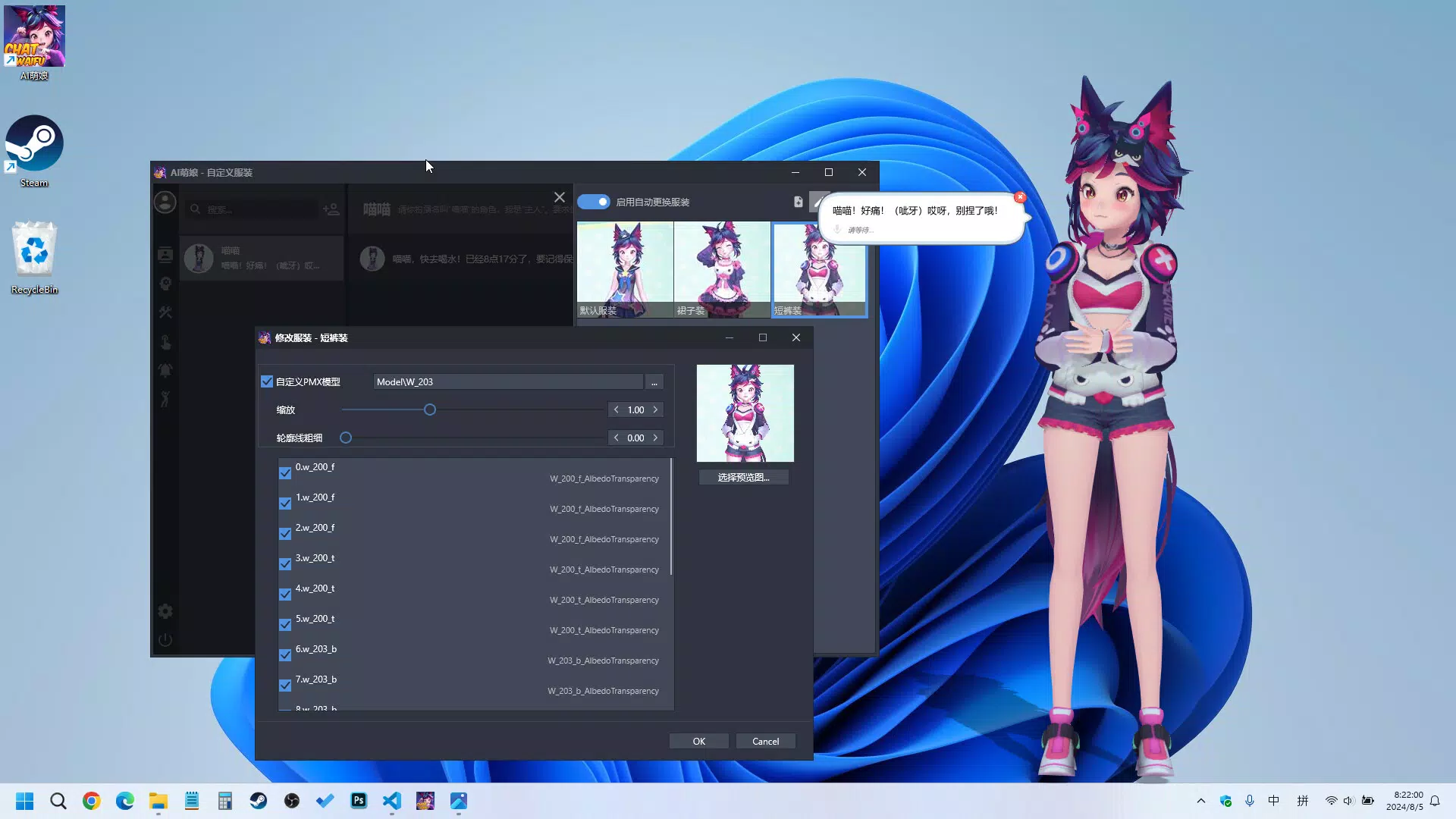
- Customizable 3D Characters: Users can import and personalize 3D character models, including outfits and poses. The AI can automatically switch between predefined appearances, adding visual dynamism to conversations.
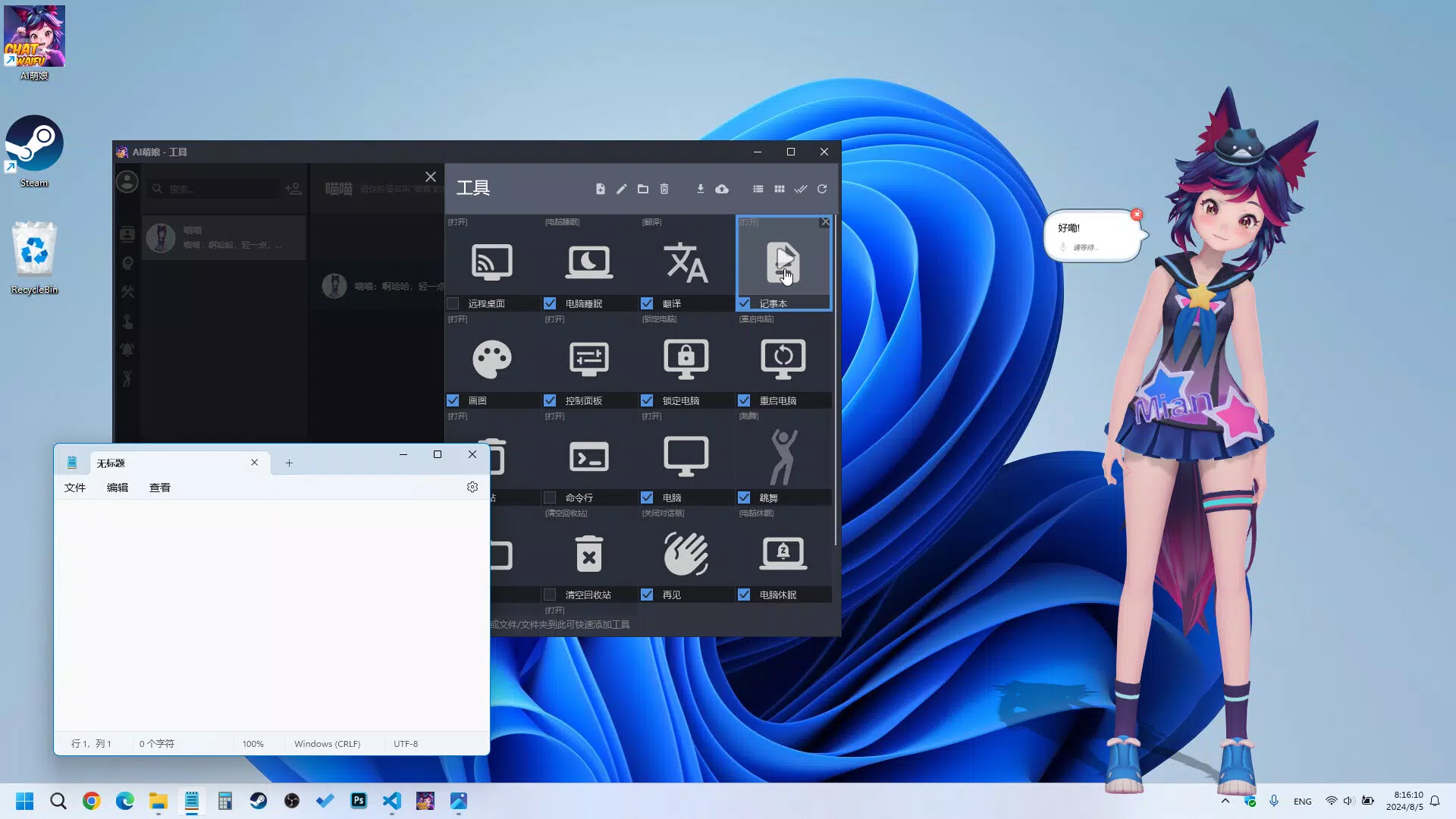
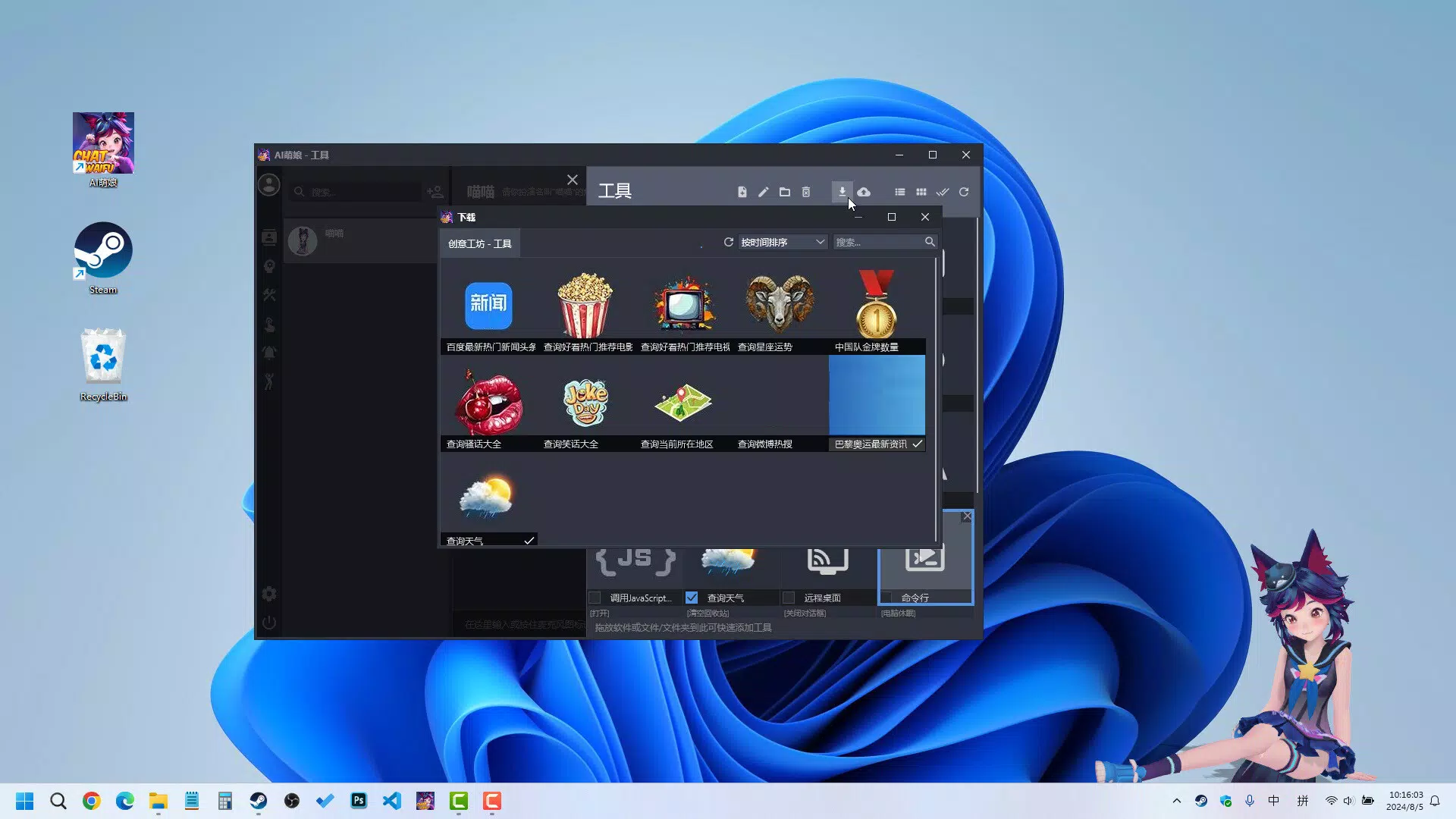
- Tool Function-Call Support: By leveraging LLM function calls, ChatWaifu can trigger scripts or retrieve real-time data—such as weather or news—without user intervention. This streamlines task execution and boosts efficiency.
- Optimized Resource Usage: Despite its rich feature set, the app is engineered for efficient performance. It maintains low CPU and memory consumption, ensuring smooth operation alongside other applications.
For example, a user could ask their AI companion to “check the weather and remind me to bring an umbrella,” and the app would respond via voice, display the forecast, and set a notification—all using local AI and tool integration. Another scenario involves customizing a 3D character to wear a festive outfit during holidays, with automatic changes triggered by calendar events. These features collectively enhance both usability and emotional engagement.
Interface, UX & Performance
The interface of ChatWaifu is designed to balance visual appeal with functional clarity. It features a central 3D character display, with contextual interaction panels that appear based on user input. The visual style emphasizes realism and expressiveness, with smooth animations and responsive feedback. Navigation is intuitive, with primary actions accessible through a minimalistic toolbar and voice command triggers.
Users can expect a responsive experience across various desktop setups. Although the developer did not list formal performance metrics, the app is described as optimized for low resource usage, suggesting it runs efficiently on mid-range systems. Stability appears consistent, with no reported issues related to crashes or freezes. The app maintains smooth frame rates during voice interactions and character animations, contributing to an immersive experience.
Responsiveness is particularly notable during real-time voice chat, where input and output are processed with minimal delay. The UI adapts dynamically to different screen sizes and resolutions, ensuring accessibility on both standard monitors and high-DPI displays. While no specific testing data was provided, the overall design prioritizes ease of use, making it approachable for users with varying levels of technical expertise.
Platform Compatibility & Technical Requirements
ChatWaifu is designed for desktop environments, with the platform specified as Desktop. The app is available in version 1.0.0 and has a file size of 1.2 GB. The developer did not specify minimum OS requirements, nor did they list supported operating systems such as Windows, macOS, or Linux. Compatibility information was not fully disclosed.
Given the app’s size and feature set, it likely requires a modern system with sufficient RAM and GPU capabilities to render 3D models and support real-time audio processing. However, specific hardware or software prerequisites were not provided. Users should ensure their system meets general desktop application standards. The absence of detailed requirements means installation may depend on trial and error for some users.
Pros and Cons
- Free to download and use with no in-app purchases
- Supports local AI models for enhanced privacy and offline functionality
- Real-time voice interaction enhances natural, engaging conversations
- Customizable 3D characters add a unique personal touch
- Tool function-call feature enables automated task execution
- Optimized for low resource consumption despite advanced features
- Developer did not provide detailed system requirements or compatibility information
- Platform-specific availability (e.g., Windows, macOS) was not disclosed
- Desktop-only availability limits mobile access
- Customization options may require technical familiarity for advanced use
- App size of 1.2 GB may be large for users with limited storage
FAQ
Is ChatWaifu safe to install on my desktop?
Yes, the app is free and designed to run locally, meaning no personal data is sent to external servers. It uses local AI models, which enhances privacy and reduces security risks.
Can I use ChatWaifu without an internet connection?
Yes, since ChatWaifu relies on local AI models, it can function fully offline. This allows users to interact with their AI companion and execute tasks without requiring internet access.
Does ChatWaifu support multiple operating systems?
The developer did not specify supported operating systems. While it is designed for desktop use, compatibility with Windows, macOS, or Linux has not been confirmed.
How do I update ChatWaifu to the latest version?
Updates are likely managed through the official distribution channel. Users should check the developer’s website or platform page regularly for new releases.
Can I customize the 3D character’s appearance and behavior?
Yes, users can import and customize 3D character models, including outfits and poses. The AI can automatically switch appearances based on context or user-defined triggers.
Final Thoughts
ChatWaifu stands out as a versatile and innovative desktop companion that blends productivity with personalization. Its ability to run local AI models ensures privacy and performance, while features like real-time voice interaction and customizable 3D characters create a unique, engaging experience. The inclusion of tool function-call support adds practical utility, transforming the app from a novelty into a functional assistant.
While the lack of detailed system requirements and platform information may pose challenges for some users, the app’s free availability and strong feature set make it a compelling choice for desktop users interested in AI-driven tools. It is especially valuable for those seeking a personalized, interactive digital companion that enhances daily workflows without compromising on performance or privacy.
Download ChatWaifu now


